Technical Guide · Interactive Surfaces

Interactive wall without touch screentechnical guide for AV integrators and large-format projects

A practical guide to defining the right architecture for interactive wall and projection-based B2B projects using glass, rear projection or video walls when a standard touch display does not scale well in size, maintenance or deployment logistics.

External Sensors Interactive Projection Multi-Touch Large-format
Reviewed by the uRAD Technical Team
Last Reviewed: April 2026
Based on AV integration and B2B deployment criteria
Definition

What is an interactive wall without a touch screen

* Indicative values that depend on sensor choice, calibration, surface and installation conditions
Definition
Interactive wall without touch screen

System that turns any vertical surface—painted wall, glass, rear-projection fabric, or PVC—into a large-format interactive space using an external sensor, a projector, and a control unit. The interaction area itself does not include embedded glass, touch electronics or digitiser layers, which reduces physical wear and makes large formats easier to scale.

Characteristics of this architecture
Extended Range
Large-area installations (>3 m)
Low Latency
Exhibition interaction
Multi-Point
Simultaneous multi-user interaction
Large UI
Large hotspots and buttons

This approach is especially useful when the project requires large diagonals, intensive use or a modular architecture. Instead of integrating visual output and touch detection into a single panel, the system separates both functions: the projector creates the image and the sensor detects the interaction.

Depending on the context, this solution may also be described as an interactive projection wall, interactive mural or large-format interactive surface in sectors such as museums, retail or education.

Business Value

Which problems does it solve in B2B Projects?

Separating the touch layer from the display hardware solves common bottlenecks around cost, maintenance and scalability.

Scalability and physical architecture
01
Format scalability

A projector and a sensor can cover much larger areas with a more cost-scalable architecture.

02
Lower exposure to wear

It avoids capacitive layers and exposed bezels that tend to degrade under heavy public use.

03
Modular upgrade path

You can upgrade one component without replacing the whole interactive stack.

Operations and privacy
04
Lower data exposure

Interaction can be handled through coordinate mapping without capturing identifiable images.

05
Software integration

Integration is straightforward when the software accepts HID events or protocols such as TUIO.

06
Public environments

Concealing the sensors helps mitigate tampering and vandalism risks

Operating principle

How the system works architecture and components

The system relies on three physically independent elements: external sensors, image projection and a computing layer. The separation between touch detection and visual output is the core of the architecture.

SENSOR PROJECTOR
01
Detection

The sensor creates the detection plane

02
Interruption

It calculates XY coordinates

03
Calibration

It aligns with the projected image

04
Transmission

It sends HID or TUIO output

05
Rendering

The interface responds in real time

Modular architecture

Sensor, projector, and software are three independent layers. You can replace one without rebuilding the others.

Integration

Application integration happens through mouse emulation (HID) or custom multi-touch development with TUIO.

Available technologies

Touch display vs external sensor:
which one fits best in each case

There are four main ways to build an interactive surface. The right choice depends on size, physical environment and the interface pattern you need to support.

* Category-level guidance only. Real performance depends on the exact hardware, UI design, room geometry and calibration quality.
Key Parameter Capacitive touch display Infrared Frame Computer Vision Camera External Sensor (e.g. LiDAR)
When It Is Usually the Best OptionCompact stations and fine-precision interactionRetrofit for existing displays and monitorsRemote gesture tracking or immersive interactionModular large format and high-traffic environments
Maximum Practical Size~98″ (costly to scale)~120″ (depends on the glass)Flexible (depends on optics/light)Highly scalable (>3 meters)
Suitability for Small UI ElementsHigh (small buttons, keyboard input)Medium-HighLow (requires large interface elements)Medium (large buttons)
Captures User ImageNoNoYes, oftenNo (Coordinate Mapping)
Physical Exposure of the SystemDirect contact with the screenExposed perimeter frameOut of reachHidden or perimeter-mounted
Calibration DependencyNone (Plug and Play)LowHigh (3D environment)Medium (projection alignment)
Integration CompatibilityHID NativoHID NativoDepends on SDK / MiddlewareHID / TUIO
Applications by sector

Where an interactive wall is typically deployed
without a touch screen

These are typical scenarios where an interactive wall, interactive mural or projection-based surface with an external sensor usually creates more operational value: culture, education and retail environments with large surfaces or heavy use.

Instalación expositiva en museo
Museums · Culture

Immersive exhibition walls

  • Need: Multi-metre continuous surfaces for simultaneous public use without interaction bottlenecks.
  • Why it fits: With no touch glass at contact height, the system reduces surface wear and the fragility issues common in heavy-use panels.
  • Typical setup: Ultra-short-throw or overhead projector plus a ceiling-hidden sensor.
  • Success factor: Design the interface with large hit areas and generous spacing for a smoother experience.
Escaparate interactivo
Retail · Storefronts

After-hours interactive storefront

  • Need: Let passers-by browse a catalogue or offer from outside the store.
  • Why it fits: The interactive hardware stays protected inside the premises.
  • Typical setup: External sensor behind glass plus rear-projection film.
  • Best Practice: Use it in storefronts with controlled lighting or night-time operation to guarantee strong contrast.
Aula interactiva
Education

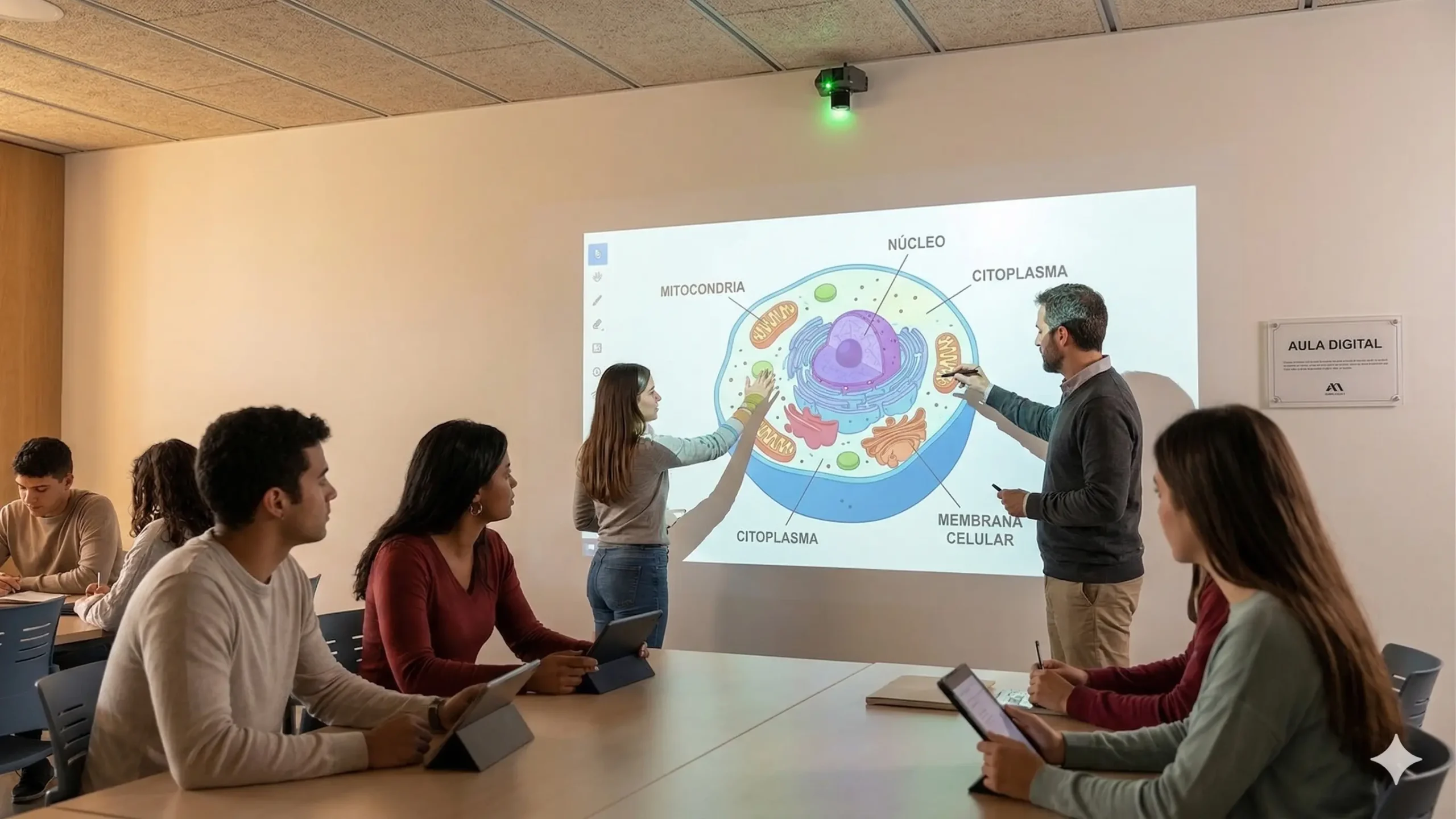
Collaborative wall classrooms

  • Need: Turn full walls into shared work zones for group activity.
  • Why it fits: It delivers better surface coverage per square metre than giant LCD panels at the same scale.
  • Typical setup: Sensor mounted above a skirting line or passive writing wall.
  • Success factor: Focus use cases on drag, drop and large-scale visual selection tasks.
Decision and fit

When this approach makes sense and what it requires

Use this section to judge quickly whether a sensor-plus-projection wall is the right architecture for your space and what constraints should be validated before planning.

Consider This
Approach When...
Consider other
options when...

The logistics and cost of giant touch displays start to penalise the budget.

Heavy public or school traffic

It reduces reliance on fragile glass panels exposed to impact.

Large-target interaction patterns

Map, gallery and menu-style interfaces are ideal here.

Low personal-data exposure

Interaction can be resolved through coordinate mapping rather than image capture.

Consider other
alternatives when…
Small UI elements or signature workflows

Dense forms or QWERTY keyboards usually need a direct touch panel.

Uncontrolled direct sunlight

Projection will lose too much contrast to remain effective.

No stable mounting points

Sensor and projector both need rigid, vibration-free installation.

Typical scenarios and recommended solutions
Small station (<65″)
Professional capacitive touch display
Exhibition wall (4-6 m)
External sensor + large-format projection
After-hours storefront
Behind-glass sensor + rear-projection film
Dense form workflow
Touch display or dedicated tablet
High mechanical risk
Ceiling-hidden sensor + projection
Outdoor in full daylight
Outdoor LED display + external sensor
Budget

Total project cost what really drives it

In large-format projects, the financial comparison should not stop at the purchase price of a display. The real benchmark is total cost of ownership, including logistics, structural support and replacement risk.

The budget for an external-sensor interactive wall is usually driven by these four variables:

01
Projector brightness and optics

Investment changes with the projector you need for the room. Standard units work in controlled spaces; brighter or laser projection is required in higher-light environments.

02
Total active surface

As touch displays move from medium to very large sizes, costs rise sharply. External sensing tends to scale more gently across wide surfaces.

03
Logistics and handling

It can reduce transport, structural support and replacement complexity compared with oversized displays, which often lowers installation and service costs.

04
Software adaptation effort

The system can emulate a standard mouse for broad compatibility, but the UI should still be designed with large targets to keep the experience fluid at scale.

Frequently asked questions

FAQ about architecture and implementation

Straight answers to the most common technical questions about feasibility, fit and integration for decoupled interactive wall architectures.

Professional interactive wall installation in a museum
When should you choose an external sensor instead of an infrared frame?

An infrared frame is ideal when you want to add touch to existing monitors or video walls and the user touches the screen directly, with no issue around the external bezel. An external sensor such as LiDAR is the right choice when the hardware must stay hidden, when interaction needs to happen through thick glass, or when the interactive area is so large that a physical frame would be impractical or too expensive.

What touch precision should you expect depending on the use case?

An external sensor architecture is not designed for millimetric-precision tasks such as handwriting on whiteboards, digital signature or detailed drawing. Typical precision is around 1-2 cm, which is perfectly suitable for most public and exhibition interfaces: pressing interactive buttons, scrolling galleries, zooming images, moving 3D objects or navigating maps.

What are the interface design limits for large-format use?

When designing software for this type of architecture, the key rule is to scale the UI. Standard QWERTY keyboards and tiny text links should be avoided. Buttons should have a meaningful physical size on the real wall, with generous spacing between elements to prevent accidental touches and improve hand-up accessibility.

How does ambient light affect the interactive system?

The sensing technology is not affected by visible light, but image projection is. In environments with direct sunlight or large unshaded glazing, the projector will lose contrast dramatically. In those cases you need a higher-lumen projector or a display technology such as LED combined with the external touch sensor.

Can a projection-based system replace a conventional touch display?

It depends entirely on the use case. For large-format interfaces, maps, visual menus or exhibition journeys, an externalised interactive wall is a more scalable, economical and robust alternative. For individual workstations, signature workflows or dense administrative forms, a capacitive touch display remains the better option.

Topology example

Applied architecture: collaborative wall classroom

A real deployment where the technical goal was to enable a touch surface wider than 3 metres without relying on exposed touch glass hardware.

Topología de aula interactiva con sensor en techo

This topology worked because of three factors: the need for a diagonal beyond 100 inches, simultaneous use by several users and the requirement to remove fragile panels from impact height.

Physical constraint

It was not logistically or financially viable to mount multiple LCD displays in line and expect them to withstand continuous heavy traffic.

Hardware resolution

A single overhead sensor scanned a 4-metre wall, paired with an ultra-short-throw projector to minimise user shadowing.

📐 4-metre XY mapping
🔌 Native HID integration
🧱 No floor-level hardware
Evaluate project fit

Want to know if this interactive wall
fits your space?

Tell us about your surface, lighting, software, country, and expected timeline. We’ll let you know if the solution is feasible and which architecture best fits your project.

1
Share your project context Surface, environment, software, timeline, and technical constraints of the installation.
2
We validate technical fit We review whether the space allows a realistic integration or whether there are limits worth detecting early.
3
Receive a clear recommendation We guide you on architecture, integration, and next steps so you can move forward with confidence.
Interactive wall feasibility assessment

Tell us about your project.

Use this form to qualify the space, surface, software environment and expected timeline.